So, you’ve been caught by a Traffic Mama, and now you’re looking for the right way to pay your fine online? Well, you’ve landed on the right page!
While Travel Nepal Today isn’t primarily focused on traffic rules and policies, it’s still an integral part of our local travel industry, isn’t it?
That’s exactly why I’ve put together this helpful guide for you. This should not only assist you in paying your traffic fines online but also support the digitalization efforts being implemented by the Nepal Traffic Police in our country.
The process is pretty straightforward, and there are actually multiple ways to do it. If you’re feeling baffled about how to pay traffic fine online, I hope this guide will clear things up for you today.
Important: If you’ve been issued a physical ticket and want to pay the fine online, skip directly to Method #3.
The other methods are for the E-Challan or Digital Chit system, which has recently been introduced in Kathmandu and is likely to replace physical ticketing in the coming years.
Key Facts About E-Challan (Digital Chit)
| App Used | Nagarik App |
| Payment Supported by | Digital Wallets (eSewa, Khalti, and ConnectIPS) |
| Fine Amount | Depends on the violation |
| Online Class Required | Drink and Drive, Lane violation, Red Light violation, and overspeeding |
Why Online Traffic Fine Method is a Smart Approach
Before we dive into the methods, let’s first explore why the transition from offline fine payments to the E-Challan system is a positive step forward, and why we should all support it:
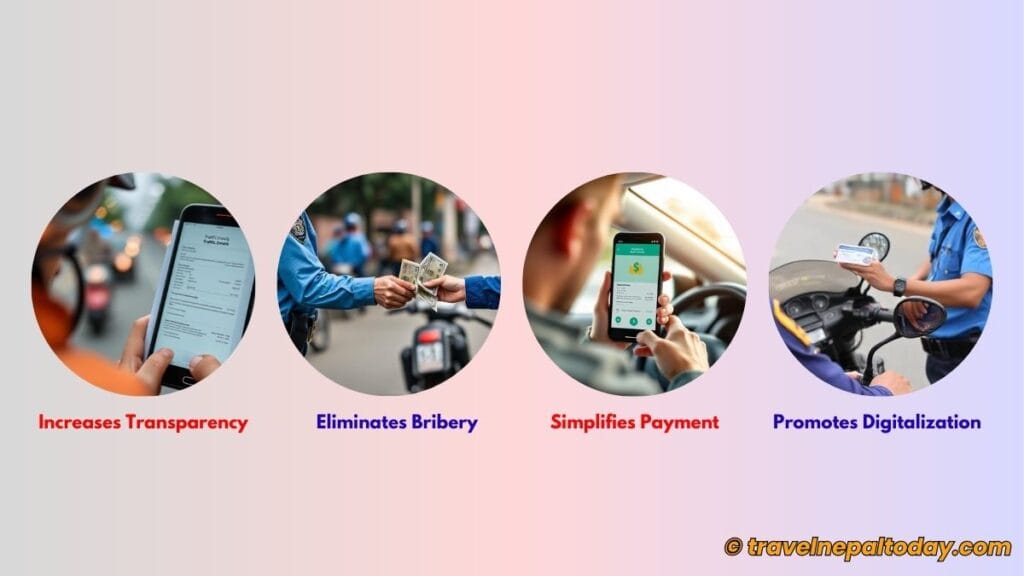
- Increases Transparency: The system enables real-time tracking, digital records, clear documentation, accountability, and public access to fine details.
- Eliminates Bribery: It ensures that no citizen can bribe their way out of a fine. A crucial improvement considering the current situation of our country!
- Simplifies Payment: The process becomes much easier and instantaneous. Violators no longer need to go through the hassle of visiting a bank to pay their fines.
- Promotes Digitalization: You don’t even need to carry your physical license, and even if you do, the traffic police won’t take it away!
This system has only been recently introduced, and at the moment, it’s primarily being implemented in Kathmandu.
However, I’m hopeful that it will gradually expand to other regions of Nepal, and I’m genuinely optimistic about this change.
In fact, I recently experienced the benefits of this system firsthand. During my trip to Latarambeshwor Mahadev, I violated the speeding limit and had to attend an awareness class.
Thanks to the E-Challan system, the entire process became seamless and hassle-free.
Method #1: Paying Digital Chit Using Nagarik App
This is the approach I followed, and it took me no more than a minute. Let me guide you through the process too.
Step 1: Link Your Driving License to Nagarik App
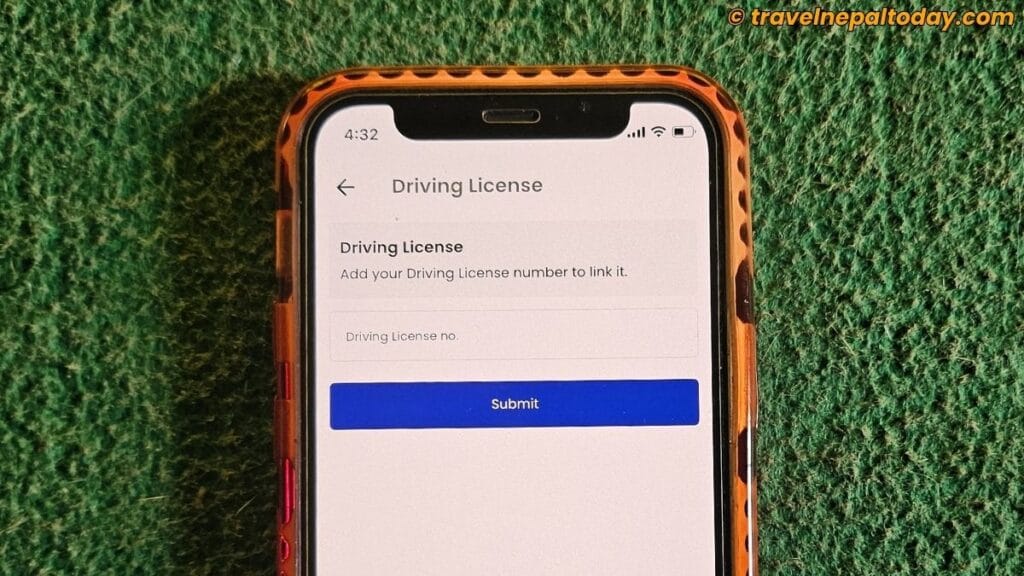
First things first—are you already using the Nagarik App? If yes, chances are you’ve already linked your Driving License too. So, you may skip ahead to Step 2.
However, if you’ve never heard of or used the Nagarik App before, now’s the perfect time to download it:
Once downloaded, launch the app and complete your registration using your phone number to finalize creating a Nagarik account. Note that you’ll need to use the SIM card registered in your name.
After registering, navigate to the Driving License section and enter your license number in the provided field. This will link your license to your Nagarik account.
Step 2: Check Your Violation Records
If you’re still stuck on the first step, don’t hesitate to leave a comment below. I’ll write another guide to help you through it!
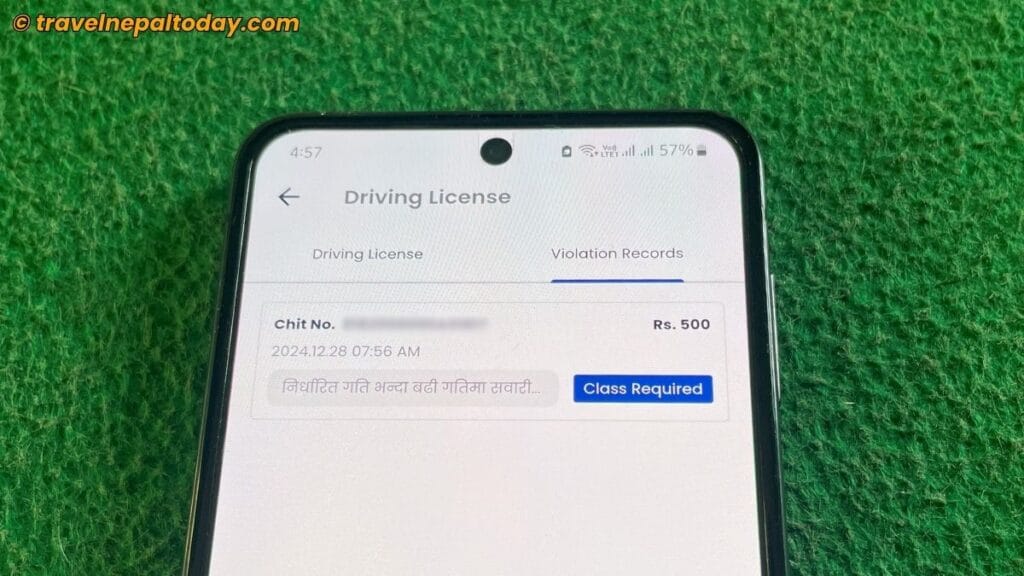
Once you’ve successfully linked your license to your Nagarik account, head over to the Driving License section. Here, you’ll find a tab named ‘Violation Records’. Tap on it.
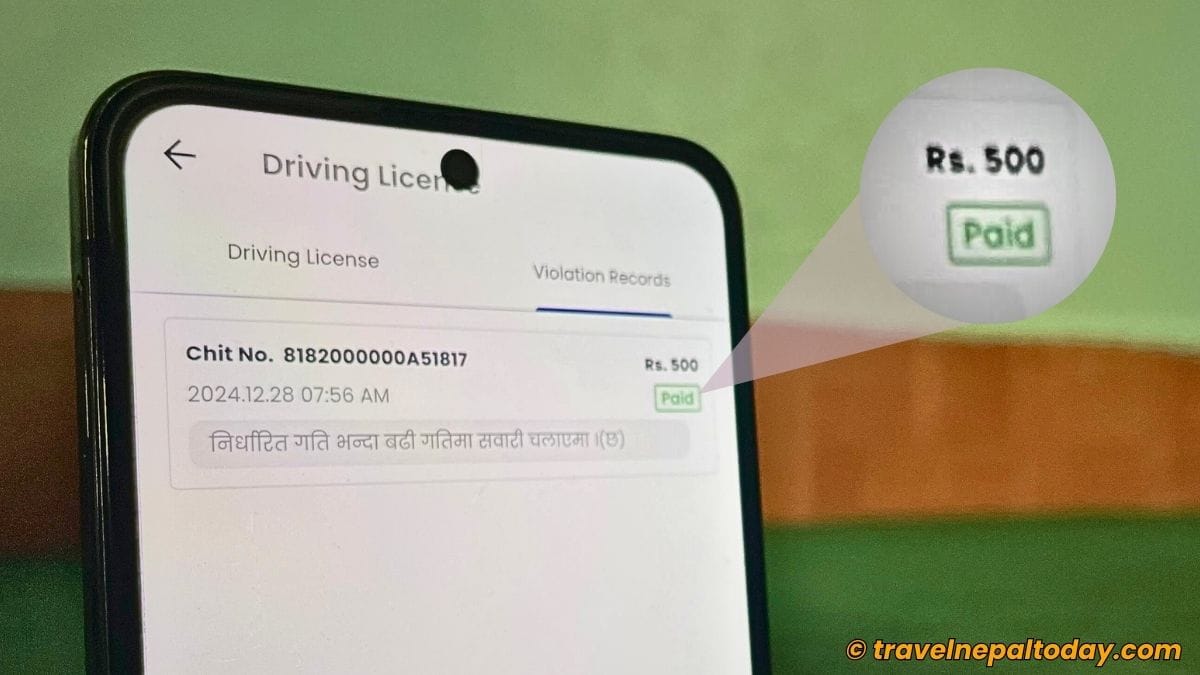
You should now be able to view all your violation records, which include the amount you need to pay, chit no., date & time of the violation, the reason for the fine, and whether or not an awareness class is required.
However, for some reason, older violations don’t seem to appear. Seems to me that only digital tickets are likely (although I’m not completely sure).
Step 3: Proceed to Pay
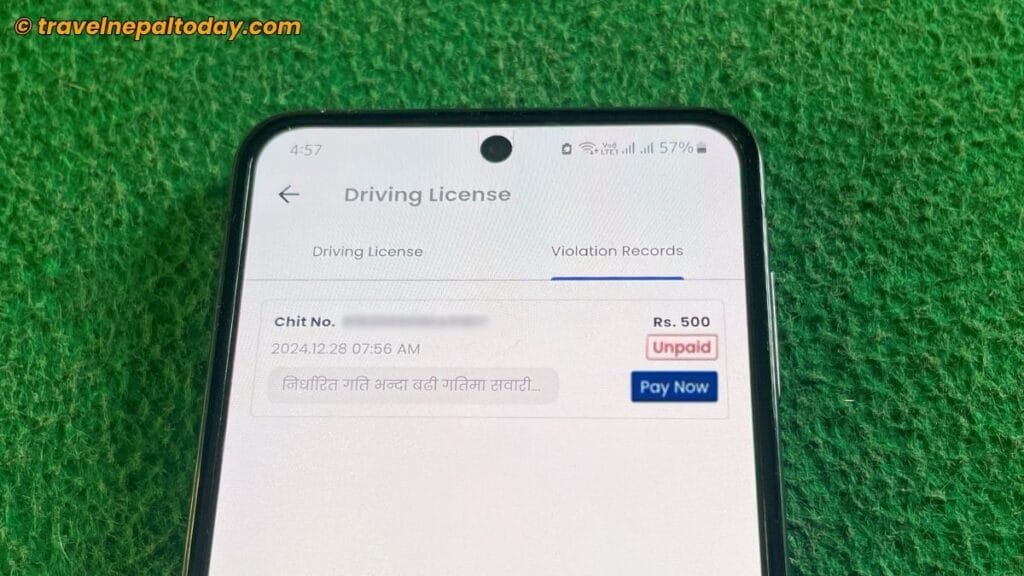
Since you haven’t paid the fine yet, you’ll notice an ‘Unpaid’ label. Right below it, you’ll find the ‘Pay Now’ button. Tap on it.
Next, choose one of the available digital wallet options. Currently, eSewa, Khalti, and ConnectIPS support this system.
Log in to your preferred digital wallet account, enter your OTP, and click the ‘Verify and Confirm’ button.
That’s it! If your digital wallet has sufficient balance, the payment will be processed immediately. If not, you’ll need to retry.
Step 4: Verify the Payment
Relaunch your Nagarik App and navigate to Driving License > Violation Records again.
This time, the ‘Unpaid’ label should be gone. However, if you have a ‘Class Required’ status, like mine in the example above, the ‘Paid’ label won’t appear immediately. You’ll need to attend the awareness class first!
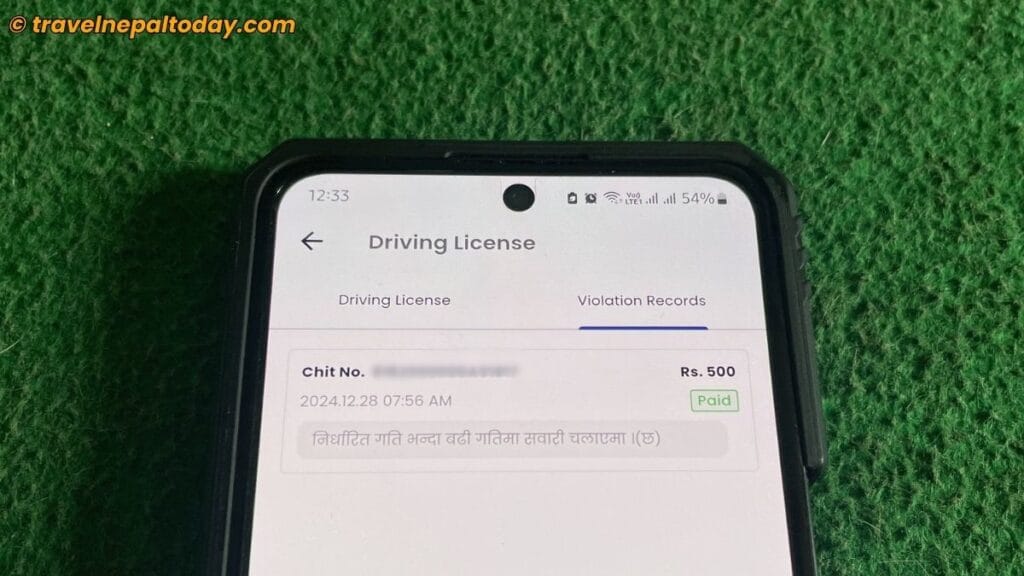
One drawback I noticed with the E-Challan system is that an extra Rs. 5.65 was deducted. I’m still unsure whether this is a tax or a service charge by eSewa, but I’m looking into it and will update it here once I have an answer.
Method #2: Paying Digital Chit Via Digital Wallet
The first method is already straightforward, and I highly recommend using it.
However, if you don’t have any of the digital wallets supported by the Nagarik App, you can always ask someone else to pay the fine for you. And you need to opt for this method.
Step 1: Copy the Voucher From Nagarik App
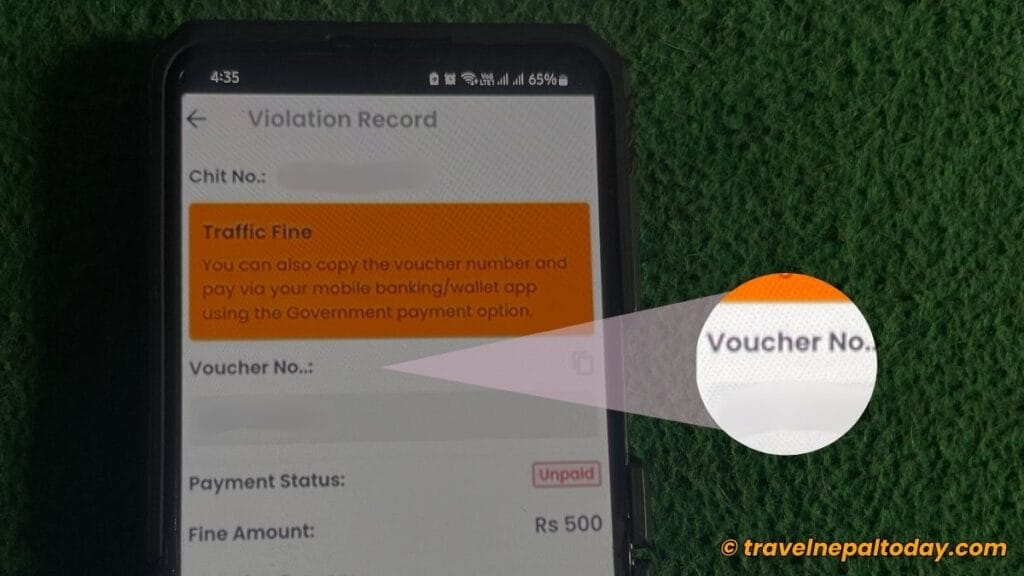
Before proceeding with the main steps, open the Nagarik App and navigate to Driving License > Violation Records.
Tap the ‘Pay Now’ button, and you’ll see the Voucher No. displayed on the screen. Copy it and share it with the person who will be paying your fine.
Don’t forget to also note the exact amount mentioned for your payment.
Step 2: Go to ‘Digital Chit’ Section on Your Digital Wallet
Launch eSewa, Khalti, or ConnectIPS—whichever digital wallet you’ve been using recently. Then, follow these steps accordingly:
- eSewa: Utility & Bill Payments > Govt. Payment > Traffic Fine Payment
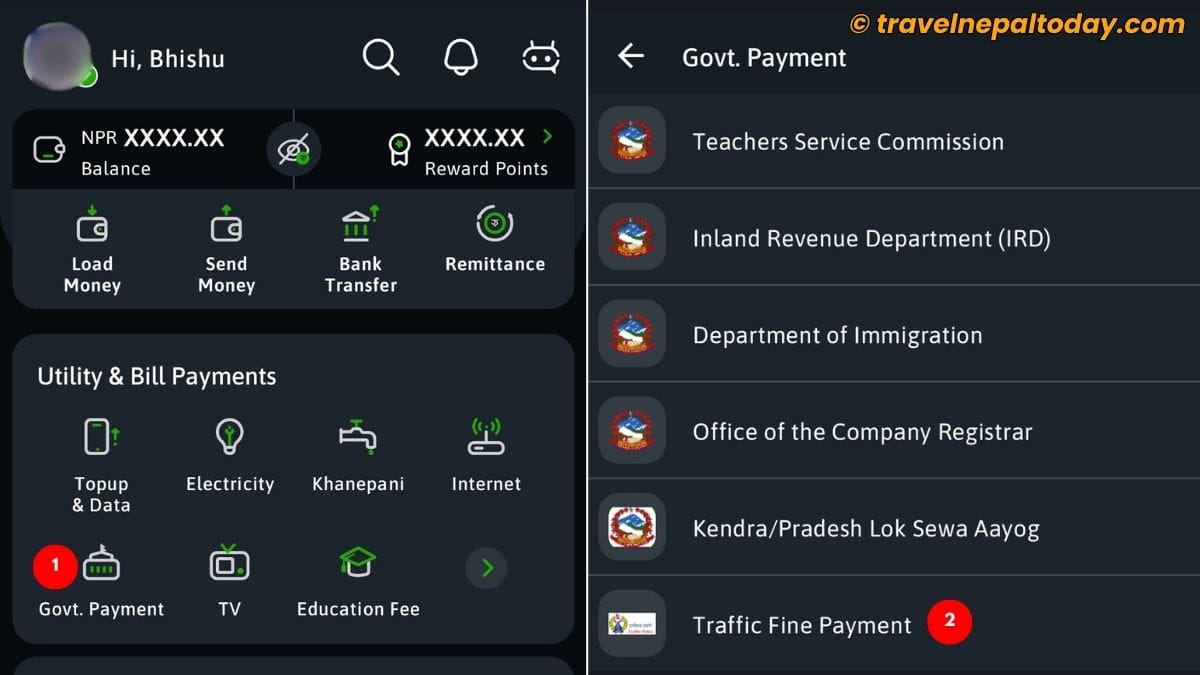
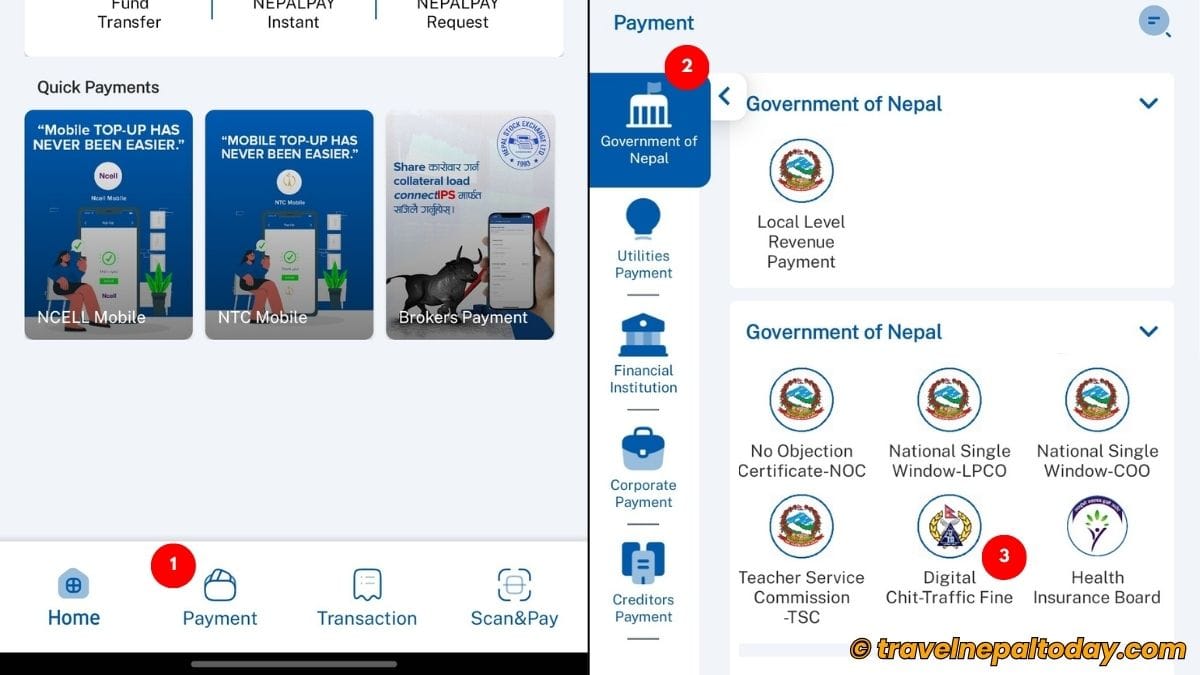
- Khalti: Recharge & Bill Payments > Government Services > Gov Payments > Traffic Payment Digital Chit

- ConnectIPS: Payment > Government of Nepal > Digital Chit-Traffic Fine
Step 3: Enter the Voucher Number
While the interface of each digital wallet app may differ, they all feature an EBP No. field.
This is where you need to input the voucher number you copied earlier.
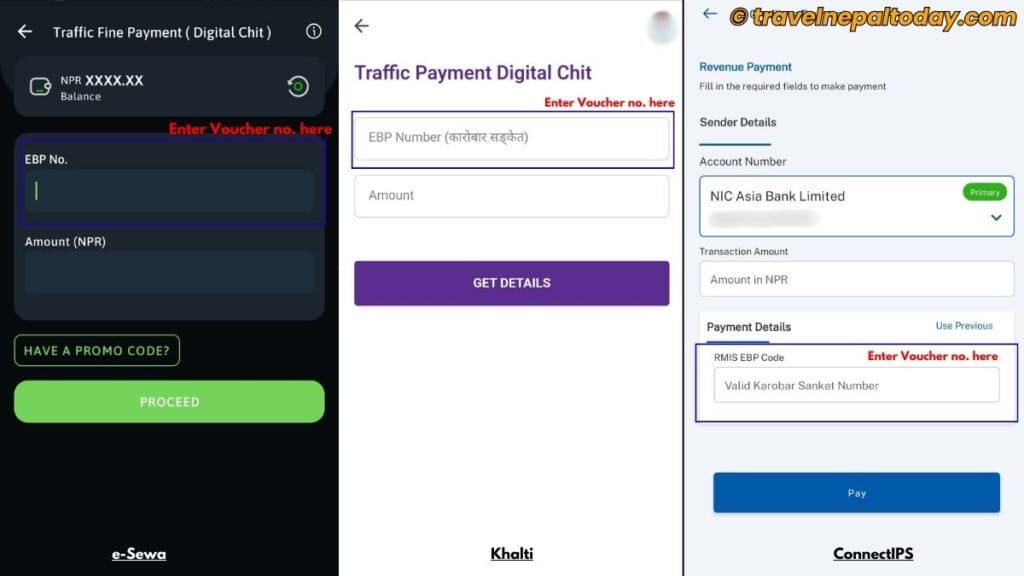
Note: Many people make the mistake of entering their chit number instead, which is incorrect.
Also, don’t forget to input the exact amount required for payment.
Step 4: Verify & Proceed
Once you’ve entered the details, click on ‘Get Details’, ‘Pay’, or ‘Proceed’, depending on the app you’re using.
Verify your details (name, chit number, violation type, etc.). You should also notice an additional charge mentioned. In my case, it was Rs. 5.65.
Finally, enter your PIN or use your fingerprint for confirmation.
Step 5: Check in Nagarik App
To confirm that your payment was successful, open the Nagarik App and go to the Violation Records section.
You should no longer see the ‘Unpaid’ label or the ‘Pay Now’ button.
Method #3: Physical Chit Payment Online
Until now, our primary focus has been on Digital Chit / E-Challan.
But does that mean you can’t pay a physical ticket online if the traffic police handed you one? Absolutely not!
Unlike the E-Challan method, the traffic mama has likely taken your driving license as well. To retrieve it, you’ll need to pay the fine—either online or offline. And even attend the awareness class (if stated).
Step 1: Navigate to Traffic Police Fine Payment Section
Each digital wallet app has a specific section for this purpose. Let me simplify it for you:
- eSewa: Utility & Bill Payments > Govt. Payment > Traffic Police Fine Payment
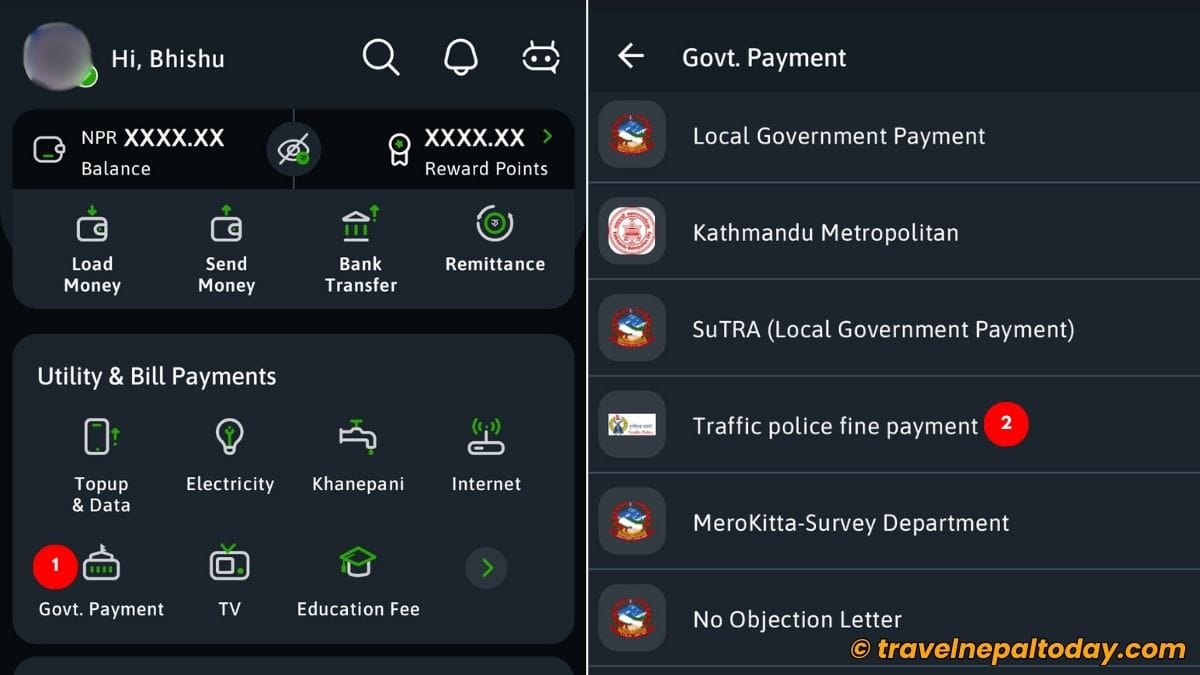
- Khalti: Recharge & Bill Payments > Government Services > Gov Payments > Traffic Police Fine Payment
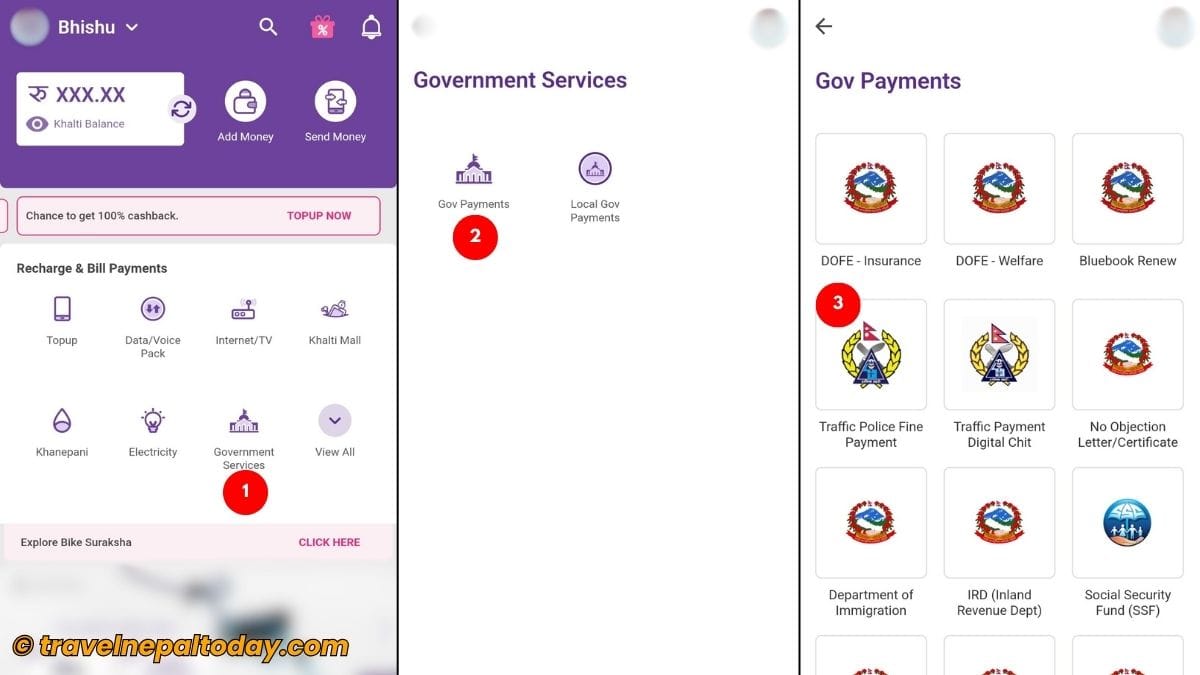
- ConnectIPS: Payment > Government of Nepal > Traffic Fine
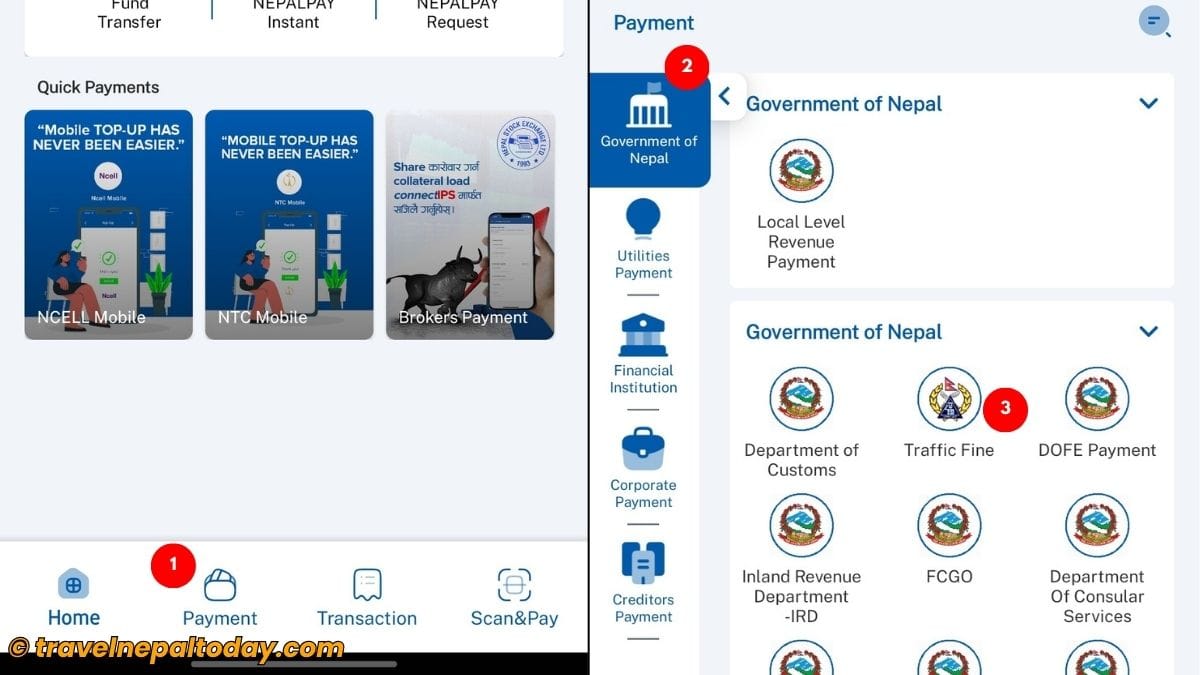
Step 2: Fill out the Form to Get Details
Now, all you need to do is fill out the form. Enter the correct details, including Fiscal Year, Province, District, and Chit No.
The Chit No. is available on your physical ticket. Alternatively, you can scan the QR code present on the ticket to generate the Chit No. (which is even easier).
Once done, click the ‘Proceed’ or ‘Get Details’ button and verify your information.
Step 3: Pay & Take a Screenshot
If everything looks correct, proceed with the payment.
As a precaution, take a screenshot of the payment confirmation. I’ve heard that some traffic police offices may request this, although it shouldn’t be necessary since the data is updated online.
If you notice any discrepancies—such as incorrect details or overcharging, contact the traffic police office they instructed you to visit.
Step 4: Visit the Traffic Police Office
Now that the payment is complete, visit the office specified by the traffic mama.
You may need to attend an awareness class next. If it’s not required, they’ll verify your information and return your driving license.
Without a doubt, this online payment system has been a game-changer for frequent travelers across the country. You can pay the fine instantly, and the traffic police will hand over your license on the spot.
Method #4: Pay It Offline
Don’t worry if the online payment system isn’t working, facing technical issues, or if you don’t have access to online platforms.
You can always visit the traffic police office directly and ask for their guidance.
If you have access to the E-Challan via the Nagarik App but are unable to use a digital wallet, you can obtain a voucher from Rastriya Banijya Bank Ltd. and proceed with the payment.
There’s also a booth available at the traffic police office for this purpose.
Once you’ve made the payment, ensure you submit the voucher to the traffic police office so they can update your records accordingly.
What Happens If I Don’t Pay Online Traffic Fine?
One concern with the E-Challan system is: what happens if someone fails to pay their traffic fine? Since the traffic police officer doesn’t take your driving license, some might be tempted to ignore the fine.
Of course, this is a thought many Nepali drivers/riders might have. But let’s be honest—paying the fine is our duty as a Nepali citizen and we must not skip it.
Here’s something important to note: failing to pay your traffic fine definitely has consequences. It’s essentially the same as the traffic police confiscating your license.
Allow me to explain:
- The QR code on your driving license will no longer function.
- If you’re caught violating traffic rules again, the traffic police will have no choice but to take your license and issue a physical ticket.
- Even if you don’t get caught a second time, your violation records still remain in the database.
- This could lead to serious consequences when it’s time to renew your license.
Since the E-Challan system is still in its early stages of implementation, the authorities are likely working on addressing the cons.
If you, as a reader, are already aware of any updates or solutions regarding this matter, please don’t hesitate to comment below. Your insights could help us all learn more about it!
What Next: Attend a Traffic Awareness Class?
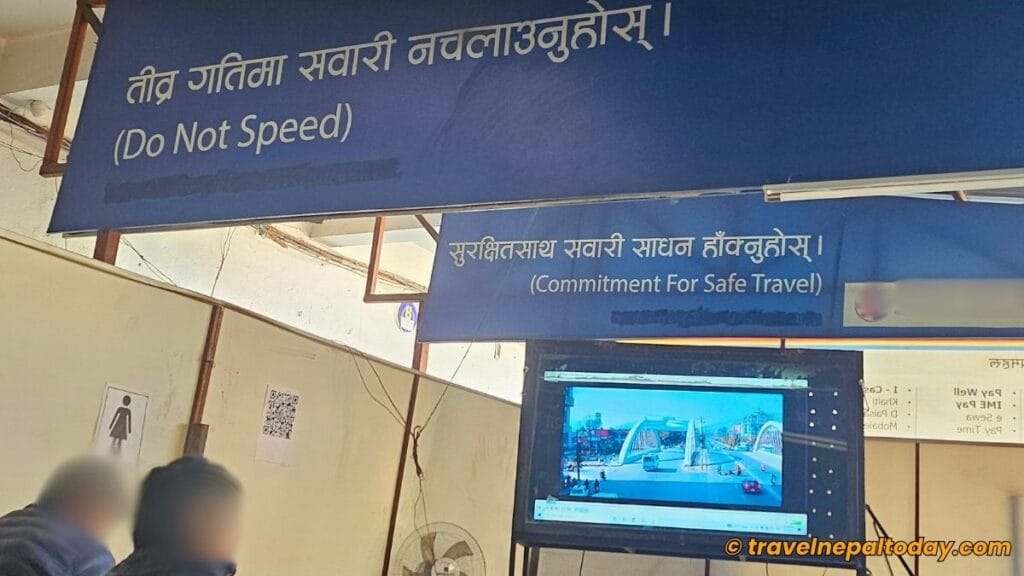
In a similar fashion, what happens if you pay the online traffic fine but fail to attend the traffic awareness class?
Well, even in my case, I was unaware of the E-Challan and only found out about it after watching a TikTok video a month later. Until then, I thought I hadn’t been penalized.
Even though I was a month late, no additional action was taken. This clearly means you can attend the class as soon as you’re available.
However, keep in mind that your violation records on the Nagarik App will continue to show ‘Class Required’ until you complete the awareness class. So, if you want to clear this status (like mine below), it’s best to attend the class asap.
For that, you’ll need to visit one of the three offices in the Kathmandu Valley:
- Kathmandu Valley Traffic Police Office, Ramshahpath , Kathmandu
- Traffic Police Complex Satdobato , Lalitpur
- Traffic Police Complex Chundevi , Bhaktapur
If you’re outside the valley, simply visit the office you’ve been instructed to attend.
I’ve also written a detailed article about the traffic awareness class. Click on the linked guide to learn more about it.
Final Words
Personally, I’ve been impressed with how the Nepal Traffic Police is working to digitize these crucial systems.
Many other governmental services have also been digitized, and the Nagarik App has played a significant role in advancing e-governance in Nepal.
Most importantly, I truly hope this comprehensive guide has helped you understand how to pay traffic fine online.
If you’d like more informative content like this, feel free to leave a comment below.
Also, please share this article with everyone you know and encourage them to bookmark this guide. It might come in handy if they get a ticket.
Happy traveling and safe riding!
About The Author